

You pay for 200 clicks and the bounce rate says nobody stayed. CTR tools only help rankings when the visits look like real searches, and plenty of campaigns skip that part.
This article breaks down four mistakes with CTR manipulation tools, from ignoring user behavior signals to mismanaging credits. By the end you will know how CTRTool structures desktop and mobile campaigns, what its screenshot proof covers, and whether its targeting and pricing fit how you actually run search visibility work.
What Is CTRTool? A CTR Tool Built Around Proof and User Behavior
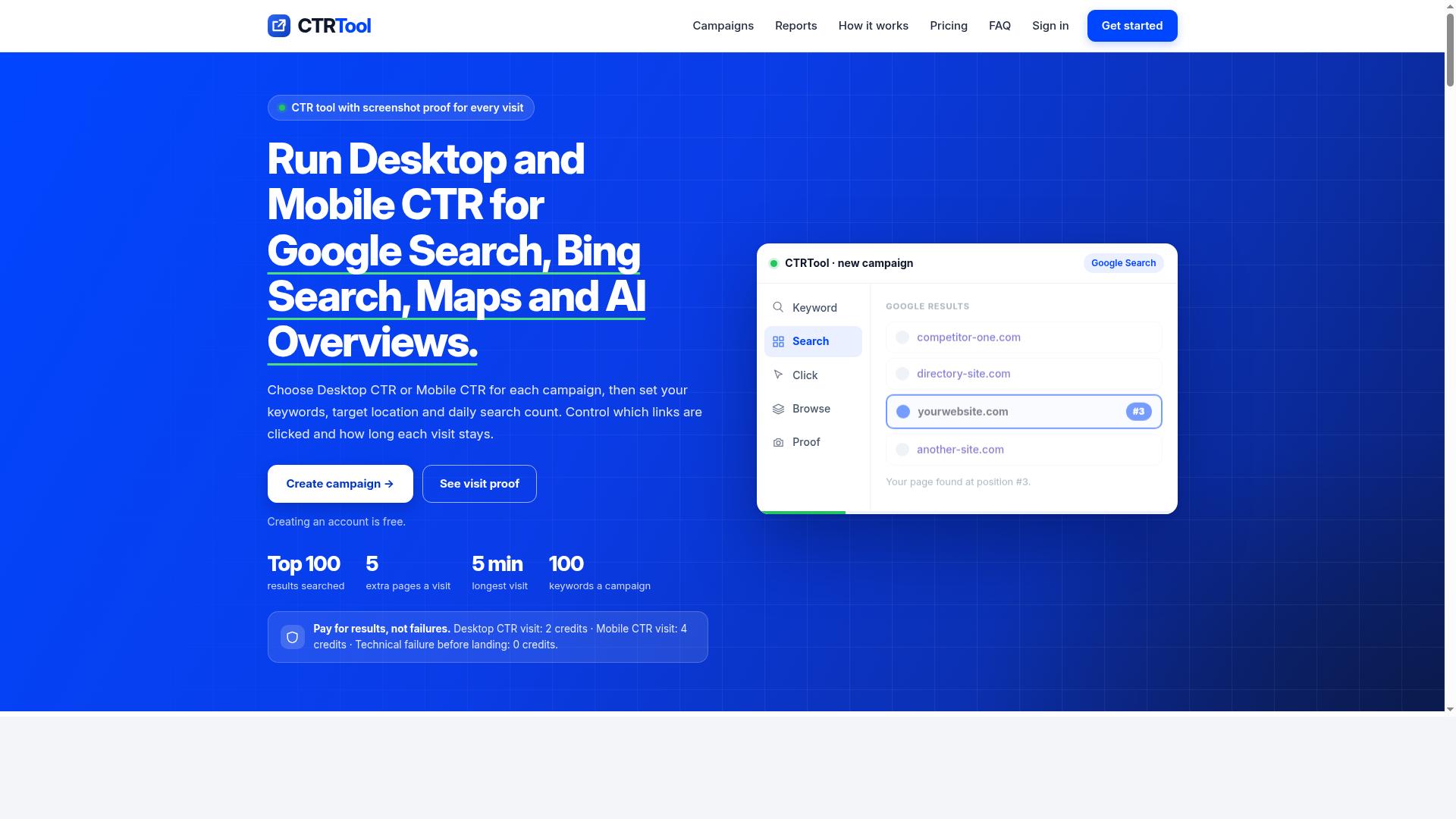
CTRTool is a CTR campaign platform that runs Desktop and Mobile click-through campaigns for Google Search, Bing Search, Maps, and AI Overviews, and it verifies every visit with screenshot proof. That combination of controlled campaigns and documented visits is what separates it from tools that ask you to trust a dashboard alone.
Most CTR manipulation tools sell volume. You pay, clicks arrive, and you have little way to confirm what actually happened on each visit. CTRTool takes a different angle: every visit is documented, so the campaign is something you can inspect rather than simply believe.
The platform covers four search surfaces in one place:
- Google Search
- Bing Search
- Maps
- AI Overviews
Each visit is recorded with search and landing screenshots as separate proof images. One image shows the search result as it appeared, and the other shows the landing page as it loaded. Together they form a simple paper trail for a tactic that is otherwise hard to audit.
Users also choose Desktop CTR or Mobile CTR per campaign, which matters because behavioral signals differ by device. A campaign that only mimics desktop traffic tells an incomplete story, and device choice is left to the user rather than fixed by the tool.
It is worth being clear about what this is not. The site itself states that automated visits do not guarantee rankings, and that honesty fits the article's larger point. CTR campaigns are a lever on user behavior signals, not a promise of SERP ranking movement. Any tool claiming otherwise is overselling.
For readers weighing CTR manipulation tools, that framing is the useful takeaway. CTRTool is built around proof and device-level control, and it says plainly what it can and cannot do. Understanding that boundary is the first step toward avoiding the four mistakes this article covers.
The Four Mistakes, Answered: How CTRTool Avoids Them
Many CTR campaigns fail because they overlook behavioral realism, verification, budget control, and targeting limits-four pitfalls CTRTool explicitly addresses.
Each mistake below reflects a gap between how a tool operates and how search engines actually evaluate engagement. Ignoring user behavior signals, skipping proof of delivery, burning credits without pacing, and missing campaign limits all create risk faster than they create results.
The sections that follow break down each mistake and show how CTRTool's design choices, from configurable visit parameters to screenshot-based proof, work against it.
Mistake 1: Ignoring Real User Behavior Signals
Search engines increasingly rely on behavioral signals such as dwell time, bounce rate, and pogo-sticking to assess result quality, so campaigns that ignore these signals risk being flagged as unnatural.
CTRTool builds behavioral realism into campaign setup. Users can configure key parameters that shape each visit, including session duration, scroll depth, and internal page visits. Visits can run up to five minutes with up to five additional internal pages, which gives a session the shape of a genuine reader rather than a single instant click.
Timing is configurable too. Daily search counts can be set to run now, spread out, or with gaps between searches, across chosen days, hours, and a time zone. That pacing helps campaigns avoid the flat, repetitive click velocity that stands out as bot traffic.
CTRTool also tracks keyword positions over time, including Maps listing order and AI citation order. Users can monitor whether behavioral signals align with ranking changes instead of assuming engagement alone moves results. When positions shift, the report shows it in context, so adjustments rest on observed movement rather than guesswork.
Together, these options support natural engagement patterns. The tool does not decide behavior for the user, but it gives the controls needed to make click-through rate and session data look like something a real visitor produced.
Mistake 2: Running Campaigns Without Verification
Without proof, it is impossible to distinguish genuine clicks from bot traffic or click fraud, which can waste budget and damage trust.
CTRTool makes verification part of every visit. Each one includes search and landing screenshots as separate proof images, and full visit paths are recorded. Users can audit each click and confirm the page actually appeared in the top 100 organic results for the chosen keyword and location.
Verification tightens for specialized campaign types:
- For Maps campaigns, the tool checks up to 50 listings, roughly five pages, to confirm the business listing was found and its website link clicked.
- For AI Overview campaigns, a matching citation is required before the visit counts.
This proof layer supports anomaly detection. If a visit cannot verify the requested location, no credits are used, and technical failures before landing are not charged either. Users see what happened rather than paying for a click that may never have occurred.
The result is campaign integrity users can check themselves. Screenshots and full visit paths turn each click into an auditable record, which matters when analytics discrepancies or click fraud concerns arise.
Mistake 3: Mismanaging Budgets and Credits
Overspending or underutilizing credits can derail a CTR campaign, so CTRTool structures plans around credit allowances and visit types to keep budgets predictable.
The credit model is straightforward. Monthly plans are priced in USD, with Starter at $59/month for 2,000 credits (up to 1,000 Desktop CTR visits or 500 Mobile CTR visits) and Growth at $125/month for 5,000 credits (up to 2,500 Desktop or 1,250 Mobile visits). One credit balance is shared across all campaign types, websites, and keywords, which simplifies tracking.
Because Desktop and Mobile visits consume credits at different rates, choosing the right mix matters. A campaign weighted toward mobile will draw down the balance faster than a desktop-only run, so the visit mix should match the device behavior the target audience actually shows.
Pacing is the other half of budget control. Users can set daily visit limits and monitor credit consumption as campaigns run. Daily goals reset at 00:00 UTC, which gives a consistent window for planning spend day by day.
Unused credits roll over while a subscription stays active, so a slow week does not mean wasted money. Combined with the pay-for-results structure, where failed or unverifiable visits cost nothing, this keeps budget predictability within reach for campaigns of any size.
Mistake 4: Overlooking Campaign Targeting and Limits
Campaigns that ignore targeting limits often waste clicks on irrelevant locations or fail to meet platform requirements, such as the top 100 organic results rule. The result is a campaign that burns through credits without producing the behavioral signals you were aiming for. CTRTool gives users clear targeting controls, but those controls only help when they are set with care.
CTRTool is a global online service with no country restrictions. A campaign can target a chosen country and optionally a state and city, or select 'Any country' to use a mix of supported locations. That flexibility is useful, but it also means a vague setup can scatter clicks across markets that have nothing to do with your keyword.
Location is only half of the picture. Each campaign type carries its own eligibility checks, and missing them is a common reason campaigns fail outright rather than simply underperform.
- Search campaigns require the target keyword to appear in the top 100 organic results.
- Maps campaigns require a check against 50 listings.
- AI Overview campaigns need a matching citation.
These rules exist to keep activity tied to real search results. A keyword that falls outside the top 100 organic results is not a keyword a search campaign can work with, no matter how well the targeting is configured.
The practical fix is to set keyword and location parameters before launch and verify them against each requirement. Confirm the keyword clears the relevant threshold for the campaign type, then narrow the location to the market you actually care about. This avoids wasted credits and supports compliance with the platform's limits.
Users who skip this step often discover the problem only after a campaign has run, when credits are already spent and the traffic pattern looks nothing like the intended audience. Understanding these limits in advance is what separates a campaign that produces coherent behavioral signals from one that fails quietly. CTRTool provides the targeting options and the eligibility checks; the discipline of matching keywords and locations to them belongs to the user.
Key Features That Support Better CTR Campaigns
Beyond avoiding mistakes, CTRTool offers features that help SEO practitioners and agencies run more effective and measurable CTR campaigns. The platform is built around proof and traceability, so every visit can be checked rather than assumed. That matters when click-through rate work is judged on behavioral signals and on what ranking movement follows.
Campaigns can run across Google Search, Bing Search, Google Maps, and AI Overviews. Each campaign can target a search keyword and click the organic result, find a Maps listing and click its website link, or locate a site inside an AI Overview and click its source link. Search campaigns can go as deep as the Top 100 results, with up to 100 keywords per campaign.
Device choice is set per campaign. Practitioners pick Desktop or Mobile CTR for each one, and delivery runs through Desktop Chrome windows or real Android phone sessions matched to the target location via managed proxy routes. This keeps device and location context aligned with the campaign's goal.
Reporting is where the tool earns its keep for analysis. Reports include full visit paths and both search and website screenshots, so a practitioner can confirm the keyword was searched, the result was clicked, and the landing page loaded. Keyword positions are also tracked over time, covering Search positions, Maps listing order, and AI citation order.
Campaign setup supports internal pages as well as a target URL, with link text, click order, scrolling time, and up to five additional pages per visit. Visits can run up to five minutes total, and timing controls cover daily search counts, days, hours, and time zone. Country, state, and city targeting are available, or Any country when reach should stay broad.
Together these features turn a campaign into something you can audit and report on. Screenshot proof reduces guesswork about whether visits happened, while position tracking shows whether SERP ranking moved alongside the campaign. Visit paths and internal page coverage give a clearer picture of engagement metrics such as session duration and page depth, which supports honest reporting to clients and stakeholders.
Pricing and Plans
CTRTool offers monthly plans in USD, with credits that translate into Desktop or Mobile CTR visits at different rates. Every plan is built around the same credit system, so the main decision is simply how much campaign volume you expect to run.
Credits are consumed per visit, and the cost depends on the device type you target. A Desktop CTR visit costs 2 credits, while a Mobile CTR visit costs 4 credits. That difference is why mobile capacity on any plan is exactly half of desktop capacity.
Two other outcomes are priced fairly. A verified search without a match costs 1 credit, and a technical failure before landing costs 0 credits. You are not charged full price when a visit does not complete.
| Plan | Price | Credits | Desktop Visits | Mobile Visits |
|---|---|---|---|---|
| Starter | $59/month | 2,000 | Up to 1,000 | Up to 500 |
| Growth (Recommended) | $125/month | 5,000 | Up to 2,500 | Up to 1,250 |
| Scale | $399/month | 20,000 | Up to 10,000 | Up to 5,000 |
| Agency | $699/month | 40,000 | Up to 20,000 | Up to 10,000 |
The Starter plan at $59/month suits a single site running a focused campaign. The Growth plan at $125/month doubles capacity and carries the Recommended label. Scale and Agency tiers extend the same structure to much larger volumes, up to 20,000 desktop or 10,000 mobile visits on Agency.
Choosing a plan comes down to two inputs: campaign volume and device mix. A campaign weighted toward mobile burns through credits twice as fast, so match the tier to your actual device split rather than visit count alone.
Unused credits roll over while your subscription stays active, and they expire when a cancellation takes effect. Creating an account is free, and custom development is quoted as a separate, agreed one-time fee.
One timing detail matters. The site lists limited launch pricing with prices rising 30% on November 15, so current rates are worth locking in early. For anyone comparing CTR manipulation tools on cost per visit, the transparent credit math here is easy to verify against your own campaign size.
Who Should Use CTRTool
CTRTool is designed for SEO practitioners and agencies running CTR campaigns for their own or client websites across Google Search, Bing Search, Google Maps, and AI Overviews. These are users who treat click-through rate as a measurable ranking input, not a guessing game.
The platform fits teams that want to see what a campaign actually did. That means tracking how behavioral signals such as dwell time, session duration, and bounce rate respond over time, rather than firing clicks and hoping for the best.
In-house SEO leads managing a single property and agencies juggling multiple client accounts both fall inside this audience. The common thread is a need for verifiable results they can report on and defend.
Beginners chasing quick wins are a weaker fit. CTR manipulation only makes sense when someone understands SERP ranking dynamics, user behavior patterns, and how to read the outcome against organic traffic and analytics discrepancies.
The site's own guidance mentions using tier links, PBNs, and test properties alongside campaigns. That points to a practitioner audience comfortable with black-hat SEO tactics and the risks that come with them, not a casual user looking for a plug-and-play button.
Because CTRTool is a global online service with no country restrictions, it also suits teams running international campaigns. An agency with clients across several markets can run activity in each region without hunting for separate local providers.
In short, the tool is built for people who measure, iterate, and take responsibility for the numbers. If that describes how you work, CTRTool is aimed squarely at you.
Final Verdict
CTRTool stands out as a CTR tool that prioritizes proof and behavioral realism, making it a strong option for SEOs who need verifiable campaign results. It is built around the idea that a click-through rate campaign is only as good as the evidence behind it, and every feature reflects that principle.
The tool's most distinctive strength is screenshot proof for every visit. This gives practitioners a concrete record they can inspect rather than trusting a dashboard summary alone, which matters when a campaign's value depends on showing that real sessions occurred.
CTRTool also supports multiple search surfaces, so campaigns are not confined to a single results page context. Combined with features that address common CTR campaign mistakes, it targets the practical failure points that undermine ranking manipulation efforts and behavioral signal work.
- Screenshot proof attached to each visit for verification
- Coverage across multiple search surfaces
- Built-in features aimed at frequent campaign errors
- Support available at vaibhav@autoblogging.ai
The verdict is balanced. CTRTool is well-suited to practitioners who value verification and control, especially those who want to audit what a campaign actually produced. It may be less necessary for users seeking purely automated solutions with minimal oversight.
For SEOs who treat click-through rate, user behavior, and engagement metrics as signals worth managing carefully, the emphasis on proof and realism makes CTRTool a credible and defensible choice. For more information or support, contact vaibhav@autoblogging.ai.
Frequently Asked Questions
What are the most common mistakes people make with CTR manipulation tools?
The most common mistakes are chasing clicks without a clear goal, ignoring how real users behave after landing on the page, targeting keywords or locations too broadly, and failing to verify that visits actually happened. Each of these undermines the value of a campaign and can make results hard to interpret. CTRTool helps address the verification problem by providing screenshot proof for every visit.
Why does user behavior after the click matter for a CTR campaign?
Search engines and analytics platforms look at what happens after a click, not just the click itself, so a visit that bounces immediately sends a weak signal. Pairing CTR campaigns with genuinely useful landing pages and relevant content gives you a more credible overall pattern. CTRTool supports this by tracking full visit paths and keyword positions over time so you can see how campaigns behave beyond the initial click.
How can I tell whether my CTR campaign visits are actually happening?
Without proof, it's easy to assume a campaign is working when it isn't, which is one of the biggest mistakes with CTR tools. CTRTool provides screenshot proof for every visit, with search and landing screenshots as separate proof images, along with full visit paths. Reviewing this evidence regularly helps you catch problems early and confirm your credits are being used as intended.
Should I run desktop and mobile CTR campaigns the same way?
No - device behavior differs, and treating desktop and mobile identically is a common mistake. CTRTool lets you choose Desktop CTR or Mobile CTR per campaign, and credits are consumed differently depending on the device type, so plan your campaign volume accordingly. Matching your device choice to how your actual audience searches gives you more realistic results.
How specific should my keyword and location targeting be?
Overly broad targeting is a frequent mistake because it spreads your campaign across irrelevant searches and locations. CTRTool lets you set keywords and target a chosen country, optionally narrowed to a state and city, or use "Any country" for a mix of supported locations. Being specific about where and what you target makes your campaign data easier to interpret.
What should I check before starting a campaign with CTRTool?
First confirm your page appears within the top 100 organic results for your chosen keyword and location, since that's required for campaigns. For Maps campaigns, note that CTRTool checks up to 50 listings (about five pages), and AI Overview campaigns need a matching source link. Reviewing these requirements upfront helps you avoid wasted setup time and credits.